CONNECT
Making bus commute easy for 18 lakh people
How I designed a city bus tracking app for Hyderabad so that people don't have to wait at bus stops for their buses.
Overview
To help people commute easy via buses in 2023, TSRTC (Telangana State Road Transport Corporation) launched an app - gamyam - that could help passengers track the location of buses. However, the app does not yet track local buses plying within Hyderabad city. This compelled me to design a city bus tracking app for the city.
Why not add feature the Gamyam app instead?
The Gamyam app has numerous flaws, including poor design, inaccurate data, and unintuitive navigation. Redesigning Gamyam would be tantamount to creating an entirely new app.
The Context
In Hyderabad a total of 24 lakh passengers daily commute through public transport, out of which 18 lakh rely on bus service, 5 lakhs use metro rail and 60K commuters use MMTS.
Why people in hyderabad rely on rtc buses ?
Extensive Connectivity
There are over 1000 bus stops and 873 routes in the city, while the metro has only 57 stations and 3 routes.
Cheaper rates
Bus pass rates vary from 1100-2400 per month, i.e 40/- per day, depending on the type of bus they are subscribing to. While an average ticket rate in metro costs around 60/- (to and fro)
Flexibile Options
There are four types of buses that operate in the city: Ordinary, Metro, Deluxe, and Luxury (AC), cheapest to expensive, can accommodate passengers with all financial capabilities.
The Problem
With an estimated population of 1 crore only 18 lakh rely on city buses due to shortage of bus fleet. Only 3,200 buses operate within city limits while an estimated 7,000 are needed.
Impact of shortage of bus fleet
Traffic congestion with the rise of private vehicles
People started to prefer to commute via their own vehicles, boosting two wheeler sales. In Hyderabad there are 77 lakh private vehicles.
Crowded buses due to low frequency of buses
This shortage of fleet led to a low frequency of bus arrivals, forcing people to board crowded buses and making footboarding a common sight.
Long hours of wait at bus stops
Fewer buses coupled with traffic congestion reach bus stops with prolonged delay resulting in longer wait at bus stops.
How can bus tracking app solve these problems?
Traffic congestion with the rise of private vehicles
Fleet Management
With the data collected, the fleet required can be accurately estimated.
Crowded buses due to low frequency of buses
Better Scheduling
Adjust bus schedules and routes based on real-time demand and traffic conditions, ensuring better utilization of the available fleet
Long hours of wait at bus stops
Live Updates
With live updates on buses, commuters can plan their journey efficiently, reducing waiting time significantly.
PEOPLE
Students and employees are major commuters of bus. While some commuters dont mind loosening their pockets with metro and private vehicles, people belonging to low income group have to rely on bus for its affordability.
About 25% employees in hyderabad earn less than 24000 monthly, as low as 9500 per month. These employees (22-45yrs) rely heavily on bus, commuting as long as 30kms from home to work.
There are 490+ colleges in Hyderabad that attract students (18-24yrs) from all nearby districts, who choose to ditch their college private buses due to their expensive fees and opt for RTC for their daily commute.
Behaviourial Insights
1.
People perceive waiting times as twice as long when the wait is ambiguous. Whereas, when given the exact wait time, they perceive the time to pass more easily.
2.
People would rather have real time data than more frequent service.
3.
People are tolerant of a delay if the bus service was more frequent(every 10min) but less tolerant if its less frequent(every 20min)
4.
The wait at the bus stop is unpleasant because people feel that the time spent waiting is time wasted, as they were idle. Anyone who has to wait for a delayed bus often becomes impatient, angry, and aggressive.
Commuters Journey
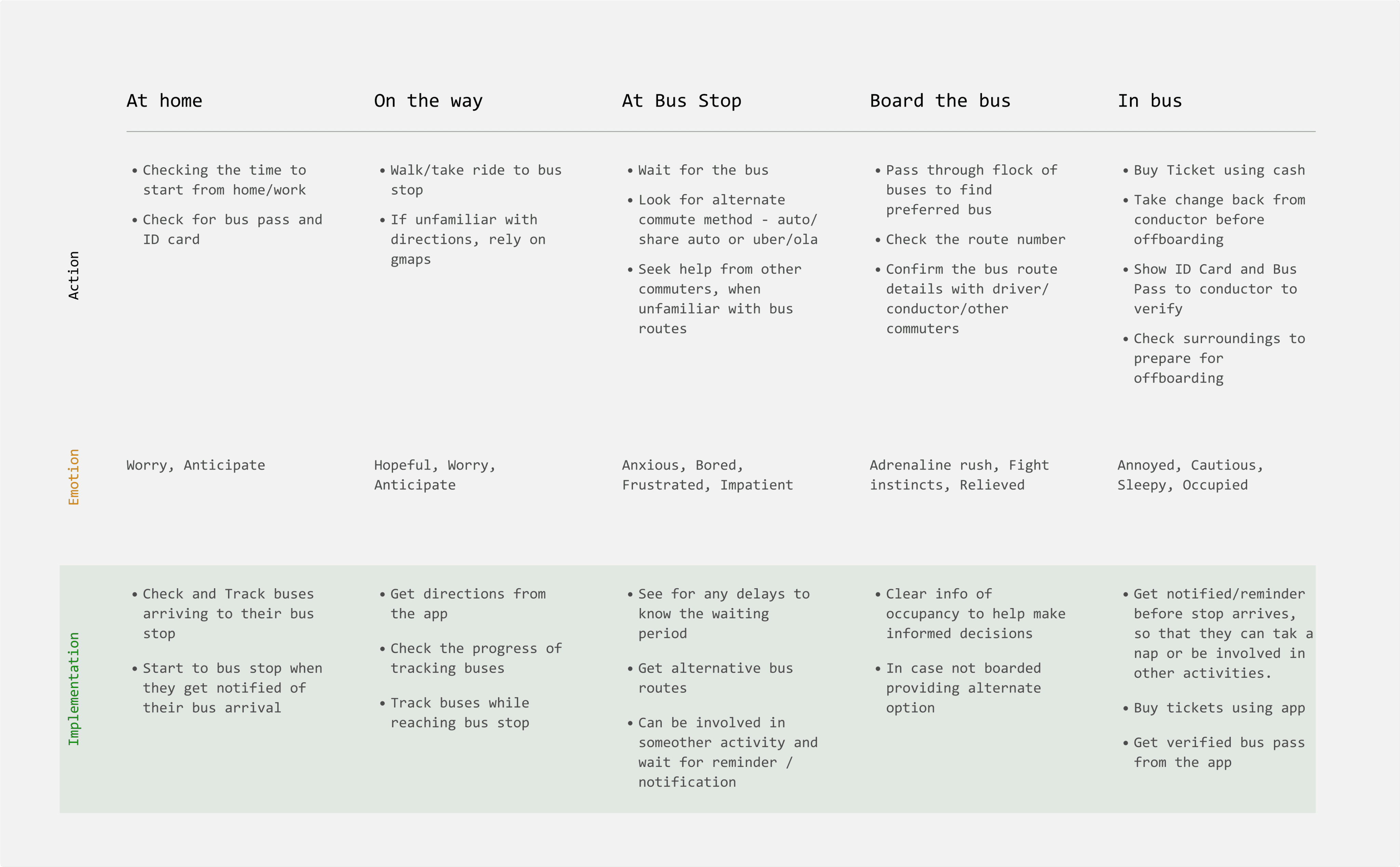
Pain Points
Waiting at bus stop
Crowded buses
?
Lack of information on bus routes and bus stops
Poor infrastructure
COMPETETORS
I began to analyse direct competitors like Moovit, Citymapper, Chalo & Gamyam to understand how they structure user flows. Additionally, I refered the waze app to know more about crowdsourcing and the mapping of information.
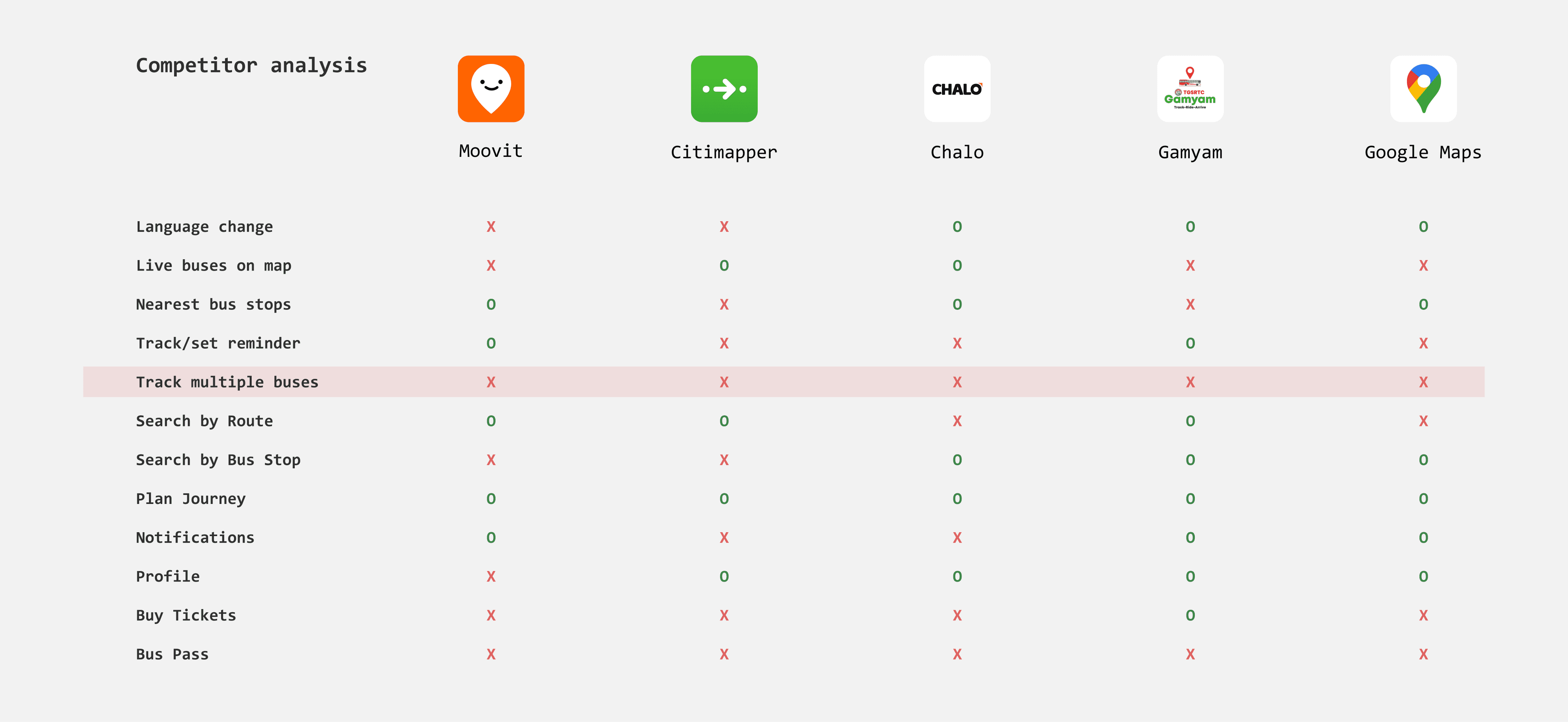
Insights from competitive apps
Fragmented search experience
When users need to find bus stops and routes the app expects them to use a different search option.
Not listing enough nearby bus stops
The user might be surrounded by more than one bus stop and the nearest bus stop might not be enroute to the bus route they were looking for.
Cant track multiple buses
Many commuters need to transfer between multiple bus routes to reach their destination. Tracking multiple buses ensures they know the status of each leg of their journey.
No Reminders and notifications
Without this feature it restricts users to keep an eye on the location of bus, which is impractical. In case the user decides to search for another stop or bus they have no ability to trace back to the previous bus information they were looking a while ago.
THE CHALLENGE
How might we help users to track and get updates on buses intuitively so that they dont have to wait at bus stops
Design Principles
Clarity
The app should be informative without overwhelming the user, reducing the amount of cognitive effort required to complete a task.
Familiarity
The app should be familiar following the common recognised patterns and interactions.
Ease of Use
The navigation of app should be simple and easy so that users can use the app in time-sensitive situations without getting confused or frustrated.
EXPLORATIONS
A bit of wireframing and tons of iterations
LAYOUT
The goal of home screen is to establish context quickly and ensure everything is a tap away. After a few iterations i finalised on iteration 4, which navigation was easy and it highlighted the search better.
I chose to keep map at forefront as they prove to be intuitive and can condense vast information in a digestible format But maps take up lot of data. So how can we optimise this data?
1. showing nearby buses and bus stops within certain radius from the user.
2. Laying relevant information, that is only mapping main roads and important landmarks.
3. Limiting the refresh of the map
Moreover, this layout is very similar to google maps which is familiar to most of the users. That means users dont have to learn much about the app patterns.
Wireframes
Iteration 1
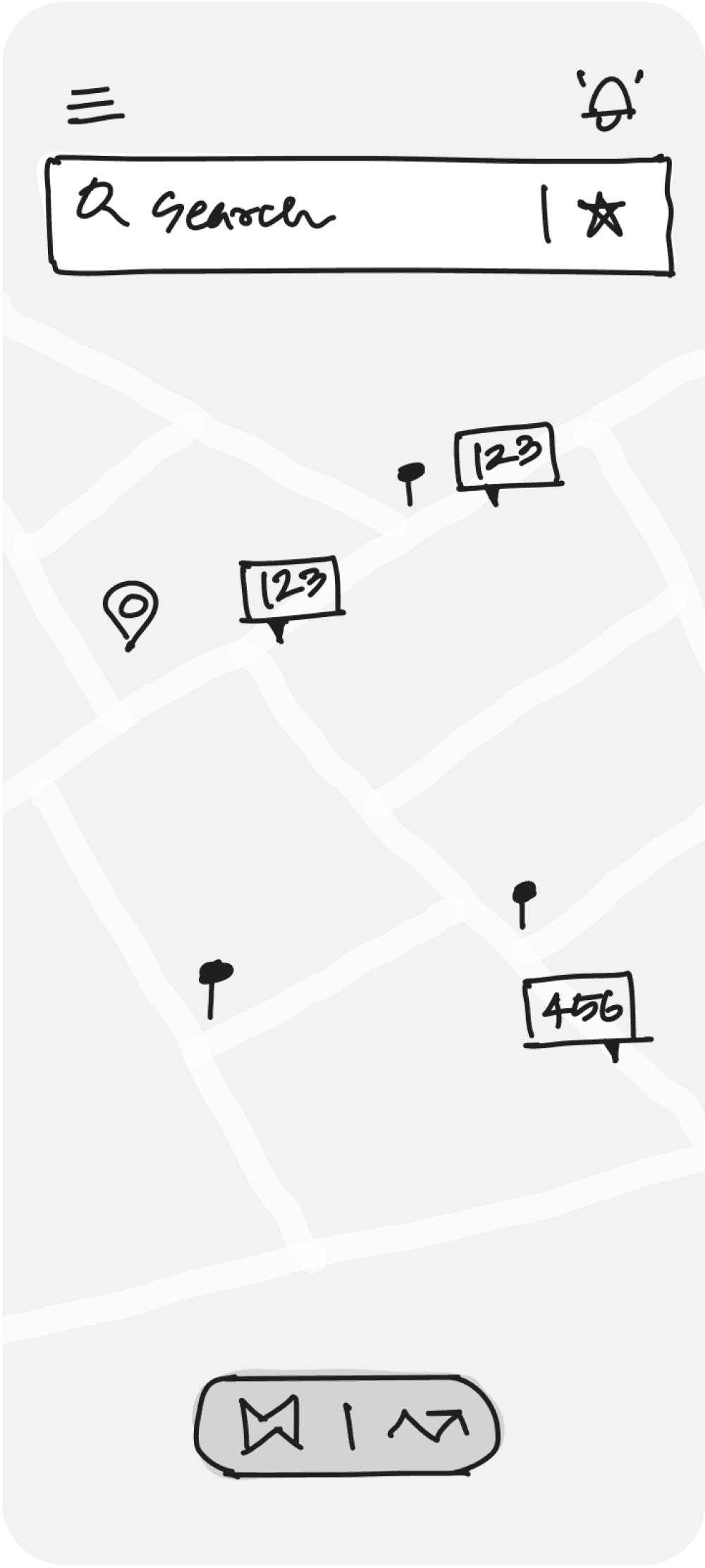
O
Clean UI
O
Easy access to saved
O
Toggle Maps and Tracking
X
Unfamiliar Navigation
X
Might not be intuitive
X
Difficult to access bus card
X
Alerts aren't prominent to access
Iteration 2
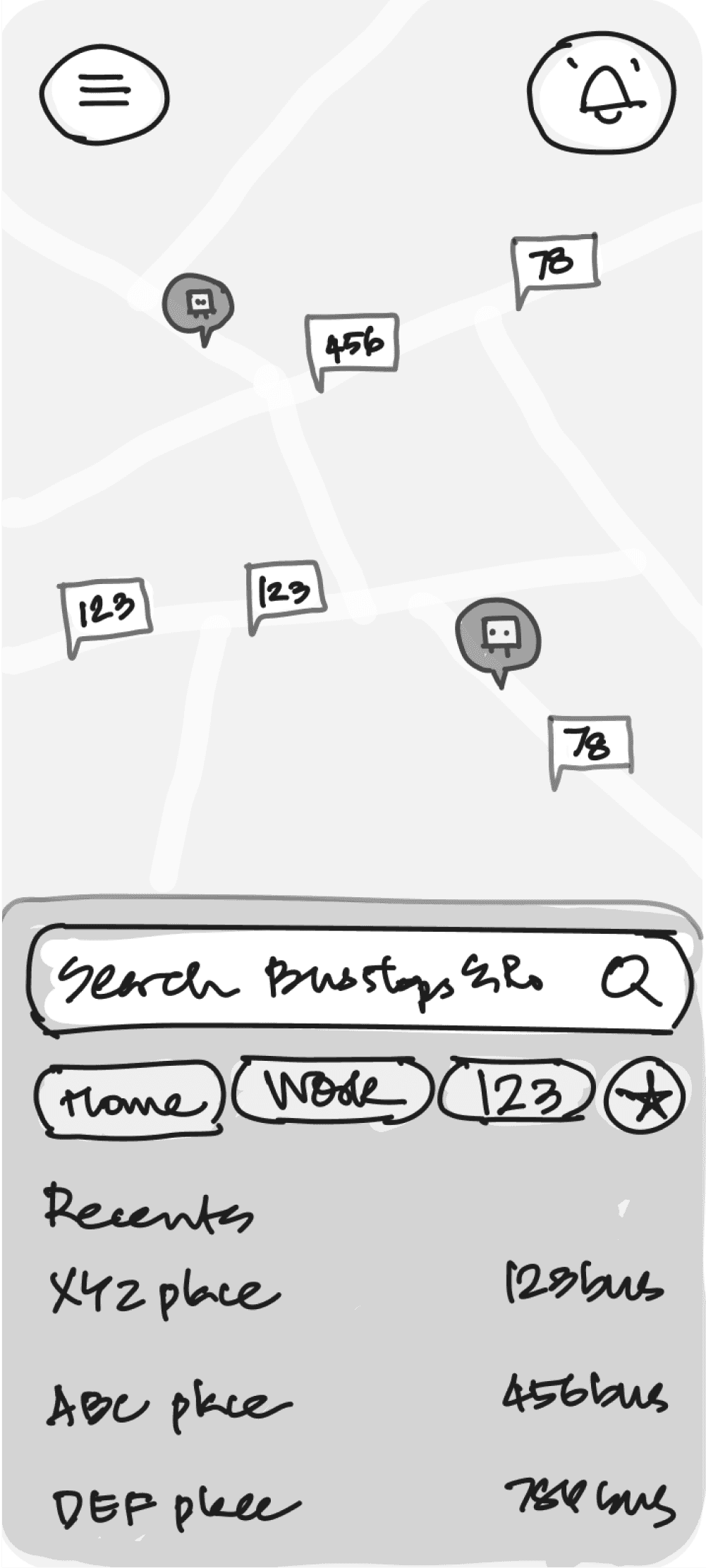
O
Closer search access
O
Visible saved options
O
Recents
X
Cant access search all the time
X
No list of nearest bus stop
X
Difficult to access bus card
X
Far access to alerts
Iteration 3
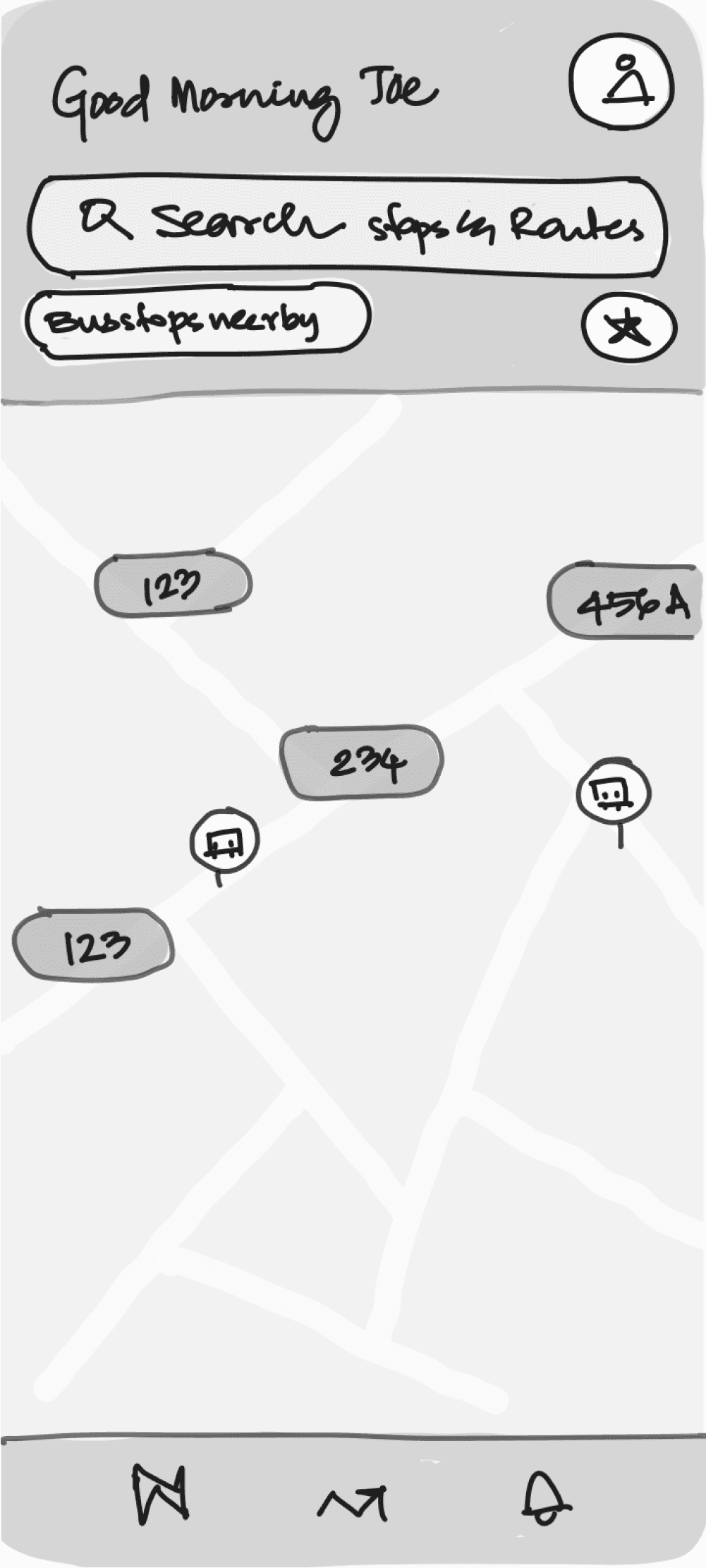
O
Greetings and profile
O
Bus stops near by
O
Easy & Familiar navigation bar
O
Easy to access all info
X
Bus stops near by arent expanded
X
Isolated profile option
Iteration 4
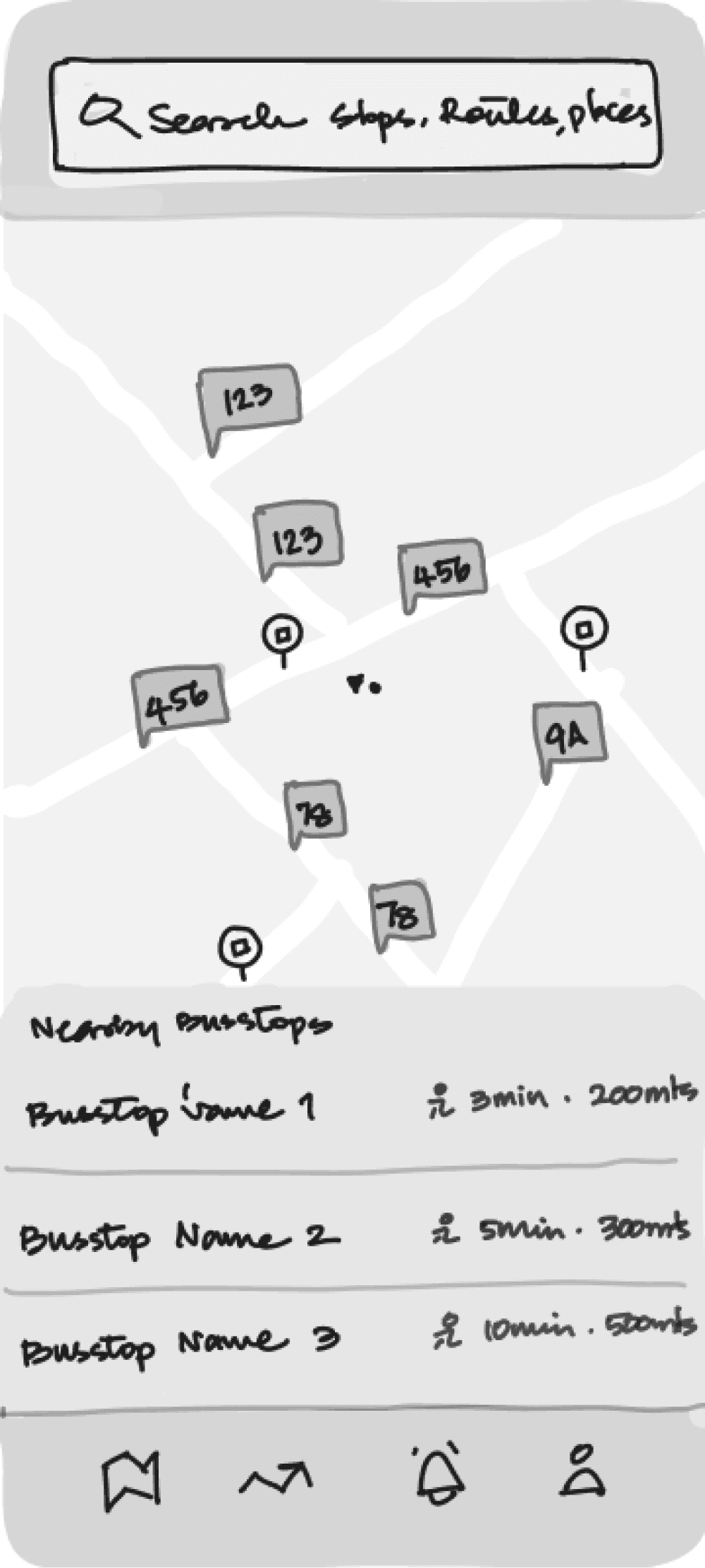
O
Easy and familiar navigation
O
Bus stops near by expanded
O
Search as sole focus
O
Prominent access to alerts
X
Saved options arent listed
VISUALS
Map and its elements
Clear and legible Map
The goal was to design a minimal map interface that has optimal contrast ensuring that labels, routes, bus stops and live buses are visible against the background.
Adapting to varied lengths of route nos
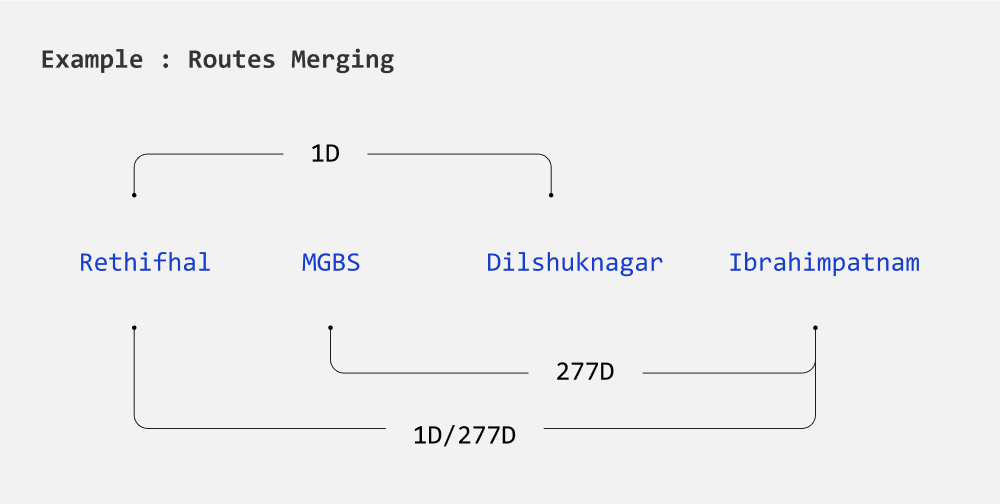
Bus routes are represented by a combination of numbers and alphabets. The numbers can range from one to three digits. The number becomes even bigger when two routes merge to form another route.
Given the varying route lengths, the representation of bus routes needed to be flexible. After experimenting with different designs, I finalized a chip-like design that expands to fit the route.
Representing the type of bus by color of bus
There are 3 bus types which vary in color - Ordinary has red stripes, Metro is in blue and luxury has pink stripes. And in future about 500 electric buses are planned to launch and i decided to represent that as well.
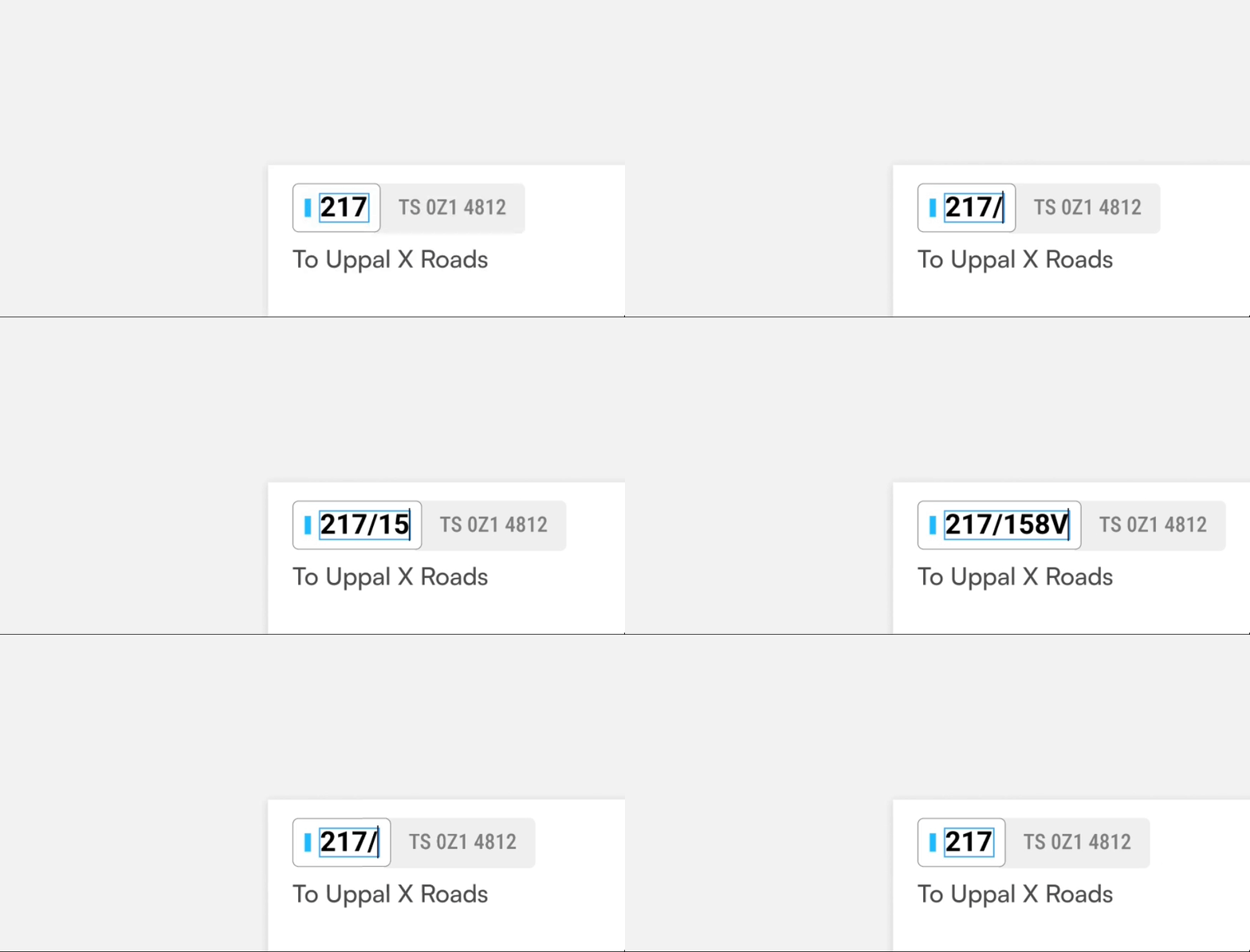
Route no - On Card

Route no - On Map
Card designs
Enough context via upcoming buses
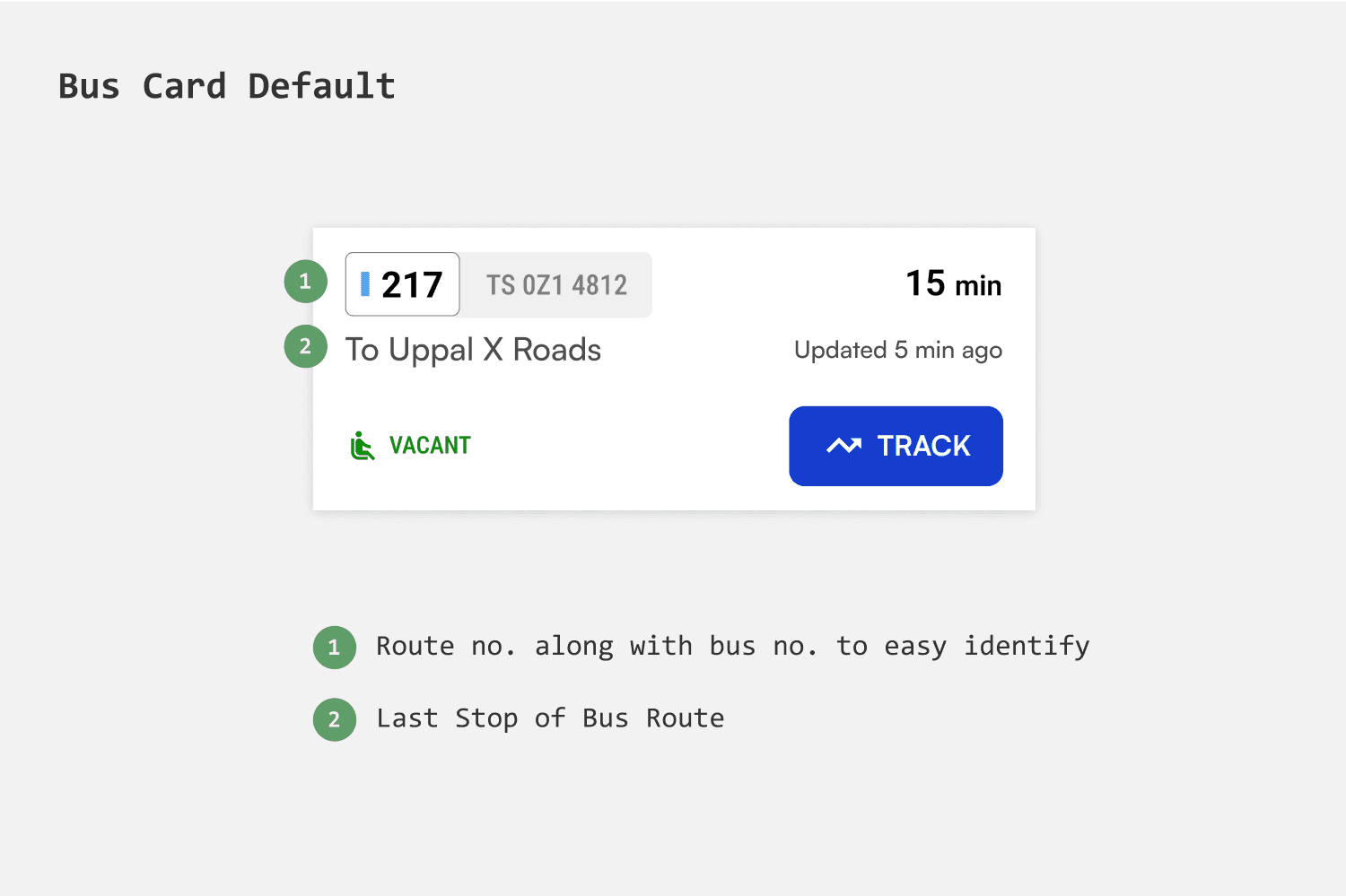
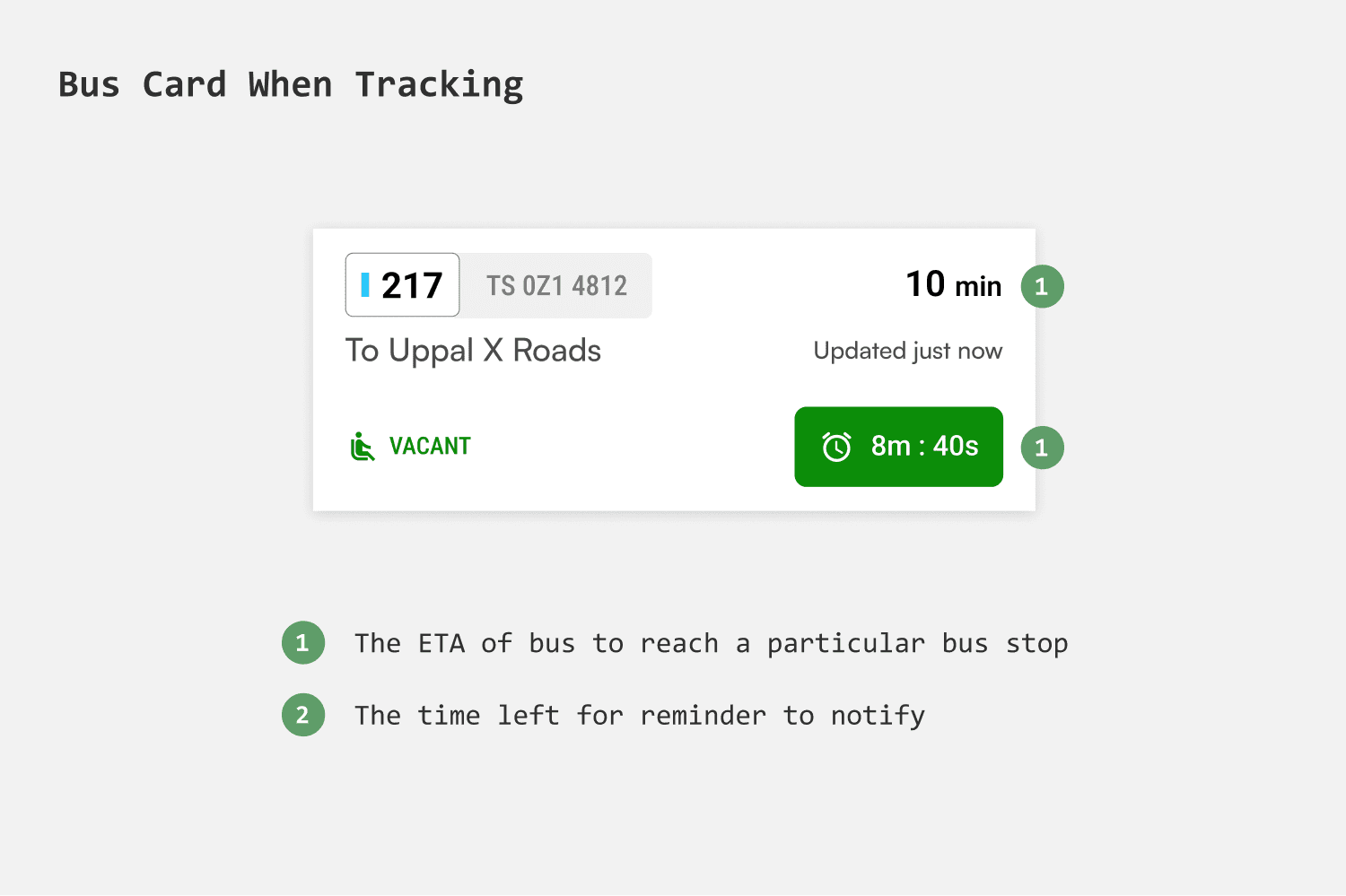
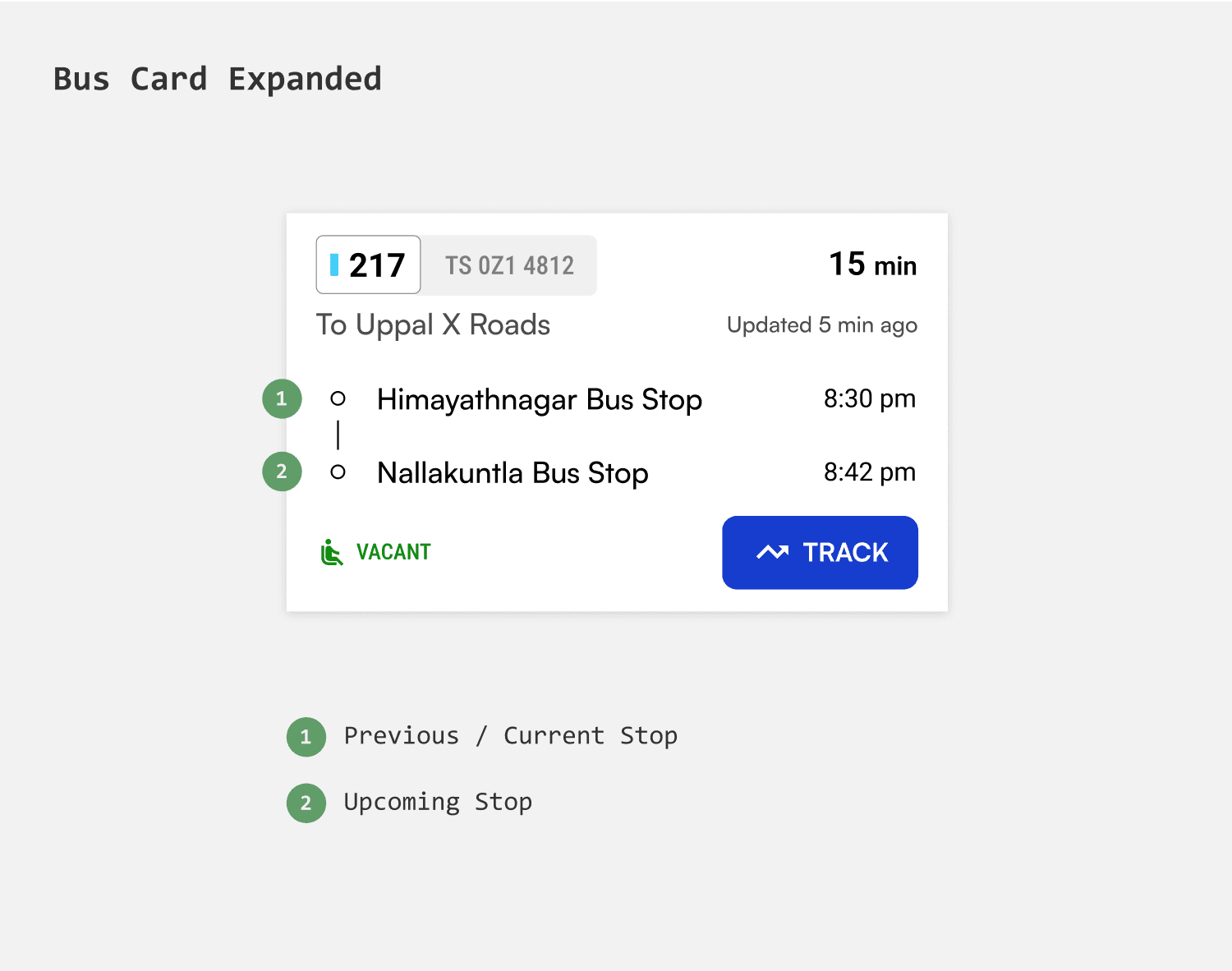
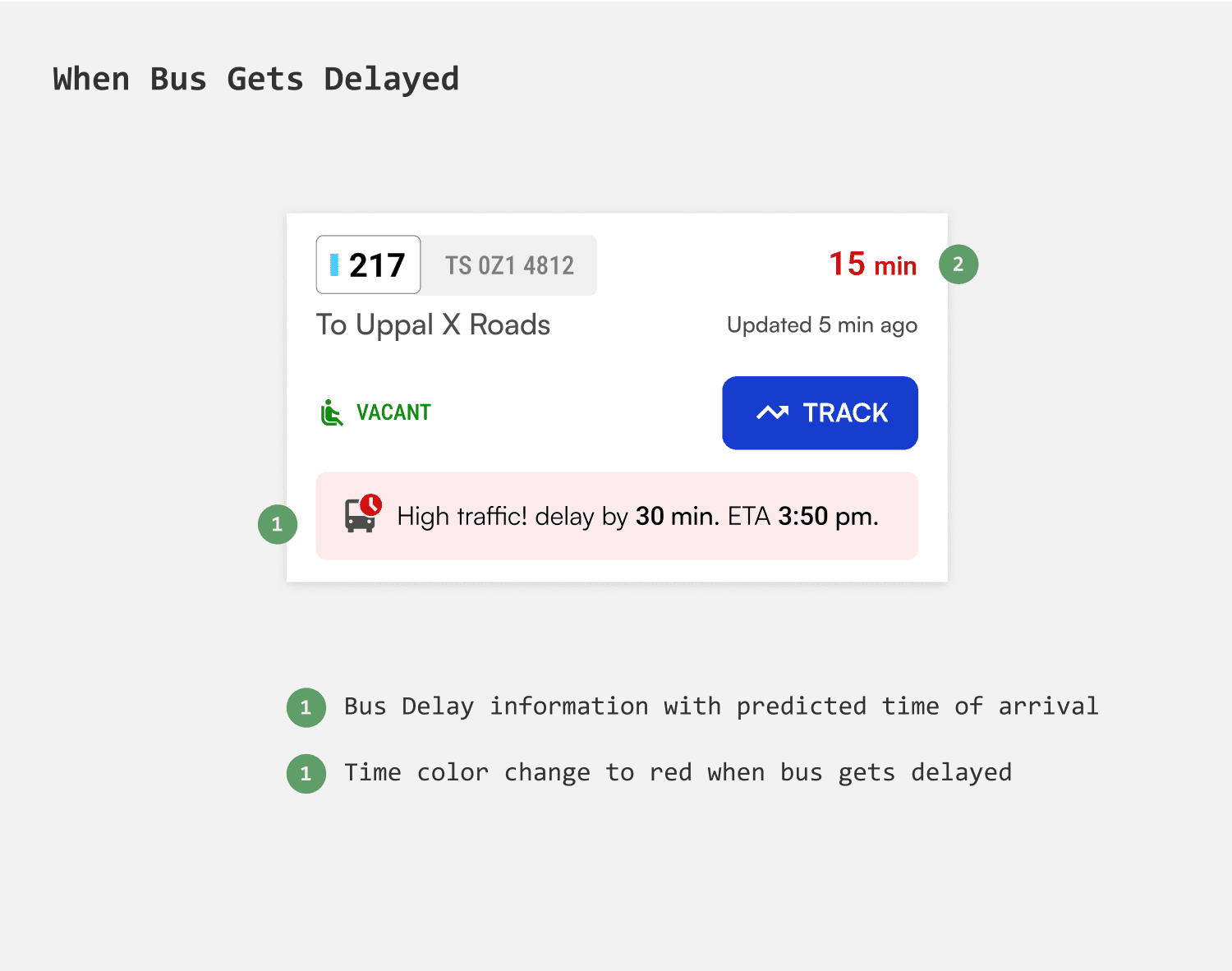
A bus card is intended to provide enough information to compare and track buses easily. Showing The main challenge in designing the card is to maintain consistency as both route numbers and destination the bus to headed towards can vary significantly in length.
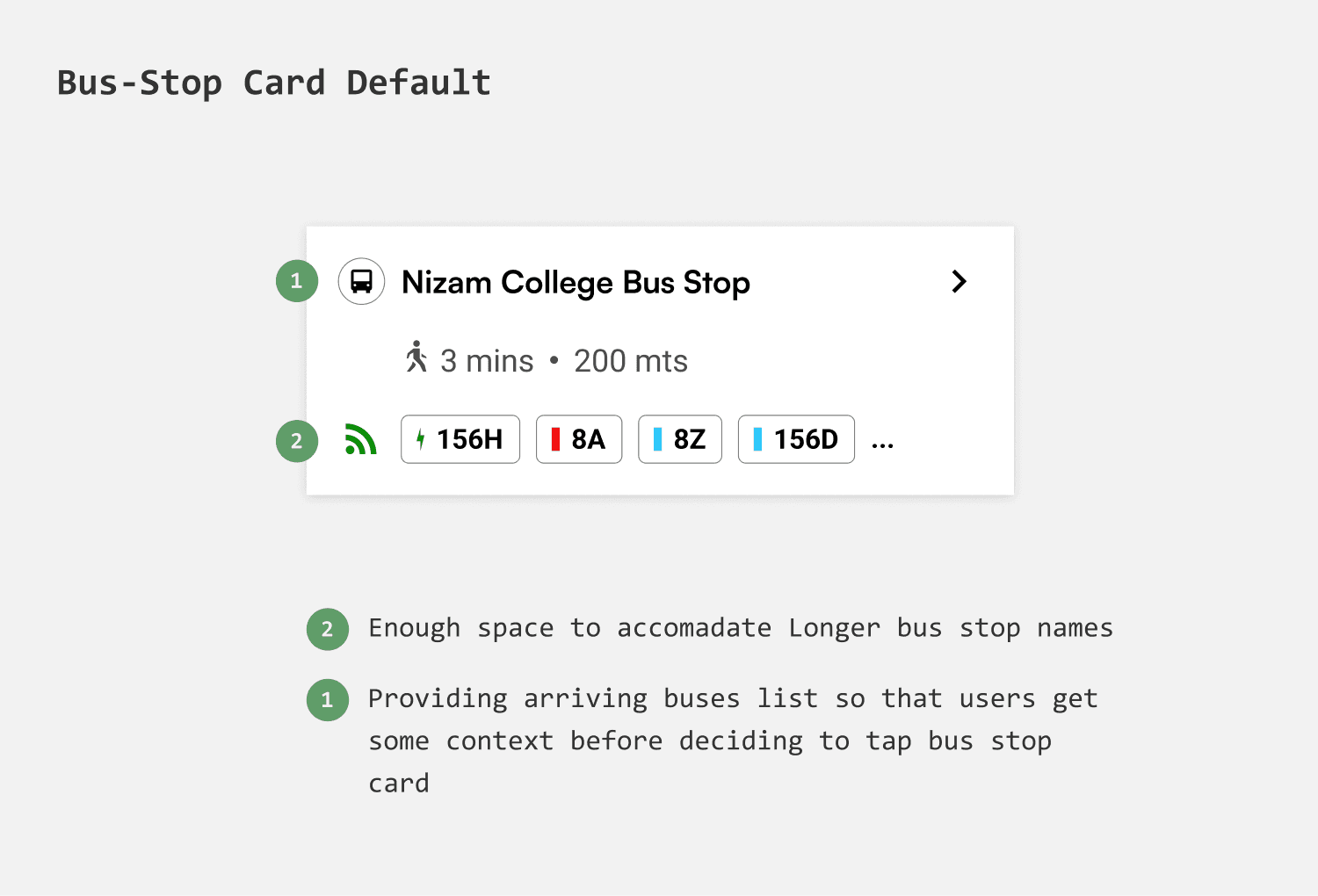
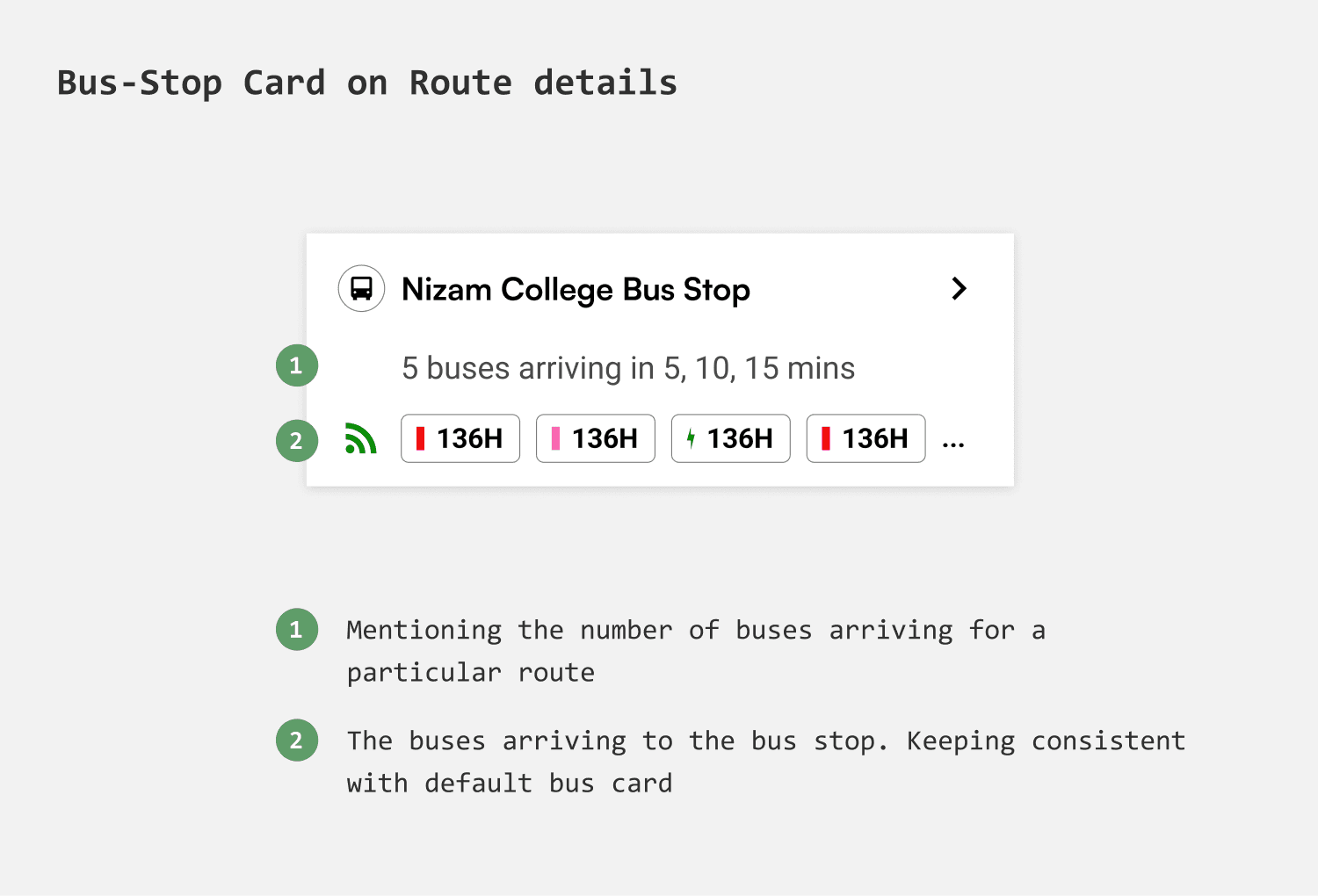
Different states of Bus card
The bus card needed to be consistent throughout all the states - Before tracking, After setting reminder, During bus ride.
The flows
Onboarding
Enabling Inclusivity by localization
Considering that the app will be used by low-income groups who may not be proficient in English and would prefer their native language, I decided to start the onboarding process with language selection.
Communicating the value
I narrowed with 3 screens, outlining the key features and potentials of the app. I wanted the copy to be as consice as possible.
Login with least friction
Since the app will be used by individuals who may not be very tech-savvy, logging in via mobile number seemed the most direct way. Moreover, SMS alerts can be sent to mobile in case of network interruption.
Search experience
Adaptive search
Search shall adapt to different queries i.e Bus Stops, Routes and even places, so that users don't have to specifically alter their query according to different search options.
Live buses via Bus Stop
Nearest bus stops & search by bus stop
Through nearby bus stop list users can access bus stops within 2km radius and with search they can get specific bus stop details directly
Showing directions
People could search for a bus stop either to know details like arrivals, scheduled buses or to get the directions. The app shall give the walking directions when the bus stop is nearby. But if the bus stop is far, it is considered as destination for which bus routes are shown.
Ditching the Map and choosing the list
In other apps like google and chalo the live buses of a route are shown on map with upcoming buses in route progress interface. This would slow down the user in evaluating buses. So I chose a list format to show all the buses so that users can compare and track with fewer interactions.
Funneling Arriving buses through filters
Users can filter arriving buses by Bus type, Time of arrival and Routes going via that particular bus stop. Thereby significantly improving the discovery of buses.
Live Buses via Route details
Intuitive Layout
To make the interface feel less text heavy i decided to divide the information into route overview and live buses, with map in between. And added color to create contrast.
Showing essential information
Instead of showing the buses arriving to the last stop, i decided to show nearest bus stop details at forefront so that it can help users plan their journey more efficiently.
Ditching the Map and choosing the list
In other apps like google and chalo the live buses of a route are shown on map with upcoming buses in route progress interface. This would slow down the user in evaluating buses. So I chose a list format to show all the buses so that users can compare and track with fewer interactions.
Search by Place
For new and unfamiliar
People new to city and residents unfamiliar with routes would search for destinations to get recommended routes. When a user searches for a place they are taken to journey guide where they are given options to choose from which is similar to any way finding app.
Compare journey options
With multiple journey options given the user might want to compare each, so i introduced a modal sheet where the user can see info of the bus routes and their likely arrivals for an easy judgement.
Step by step guidance
Having the journey broken into steps would make it easier for users to grasp and follow along. These steps can appear on home screen guiding them through the journey. In scenarios where users need to track multiple buses at different bus stops, they can seamlessly transition from one step to the next, ensuring they can track buses for each step of their journey effortlessly.
Tracking buses
Flexibility in choosing buses to track
When users access the live bus list, they can specifically select buses to track based on ETA, occupancy, and bus-type. Listing buses by ETA, rather than grouping by route, enables commuters to quickly choose the fastest option, reducing wait times.
Filters
Users can funnel the Live buses based off Routes, Arrival times and Bus type, simplifying the navigation through buses.
Stages of Tracking
1.
Set a reminder to Onboard
When a user wants to track a bus they get to set a reminder and i gave an option to save the reminder settings so that the user dont have to do it everytime they track a bus.
2.
When bus is near
when the bus is about to arrive the app shall notify the user with bus details and the time left to for bus to reach onboarding stop. With the options dismiss or remind again the user gets reminded in case they want when bus is arriving the boarding stop.
3.
When bus is at bus stop
And when the bus finally reaches the Onboarding stop the app would notify about the arrival. From there user can tap on “board the bus” to confirm Onboarding.
4.
Ask if user is on board
But how would the app determine if user have boarded the bus if they miss to confirm? In this case when the user is going in same direction as the bus the app asks the user if they are on board.
5.
Set reminder to Offboard
Users can set reminder to Offboard so that they dont have to keep checking their phone.
FIGMA FILE
Screens, Flows, Competitors etc
Ctrl+Scroll to Zoom in & out. The file might take a while to load.
TAKEAWAYS
I have learned to derive insights from data and transform them into design. I have gained a better understanding on mapping userflows, painpoints, goals and user behaviour.
I have realised that designing simple interfaces can be deceivingly simple, are challenging and tricky.
In future I would like to add more comprehensively thought interactions and additional features that can deliver hands free experience.